 SEARCH
Local SEO software organizes the work around your business’s presence in Google Search and Maps. It can help you manage your profile, website information, reviews, and reporting in one place. It cannot make Google rank or recommend your business.
- What the software can help you manage
- What remains your responsibility
- How to judge the scope of a plan
- Which promises to question
What the software can help you manage
A local service business appears in more than one place. A prospective customer may see a Google result, a map listing, a website page, or a review before deciding to contact you. Local SEO software gives your team a workflow for keeping important business details organized across those sources.
For Closematic AI, that work covers your Google Business Profile, website, reviews and AI search, done by our system and team. Both plans include work on Google AI Mode and AI Overviews. These parts belong together because a customer should encounter clear, accurate information about the same business wherever they begin.
The system can help you update and review information. It cannot control the order of search results, force a map placement, or determine what an AI experience recommends. Those outcomes remain with the platforms showing the information.
Business profile and Maps
Your business profile carries details that matter to local discovery. Before changing anything, establish which business owns the profile, who can edit it, and whether its services and contact information are accurate. Managing that profile is ongoing work: business details change, new reviews arrive, and customers need a reliable way to recognize the right company. Google’s profile editing guide describes the information a verified business can maintain.
A software plan is useful when it helps your team keep that work visible. It becomes less useful if it hides what changed or encourages you to treat a search position as a guaranteed deliverable. The practical question is whether the system makes your own information easier to maintain.
Website and service information
A website provides a home for your service descriptions. The New Google includes a bonus one-page website, and The New Google & AIs includes a local website instead. A custom domain is separate. The website can only be as accurate as the business information you supply during setup.
Write for someone evaluating a real service, not for a string of search terms. Explain the service, whom it serves, and what a customer should do next. If a statement is uncertain, leave it out until you can verify it. Consistent facts are more useful than broad claims that sound impressive but cannot be supported.
Reviews and reporting
Review replies let your business respond to customer feedback. With Closematic AI, our system and team request reviews from real customers and reply to the reviews you receive, in both plans. The response still represents your company; check that it is appropriate, accurate, and respectful. A tool can make replying easier, but it cannot replace judgment about an individual customer experience.
Reporting gives the team a way to inspect the work. Decide in advance which signals matter to your business and which changes are under your control. A report is evidence of activity or observed performance, not proof that a specific change caused a new search placement.
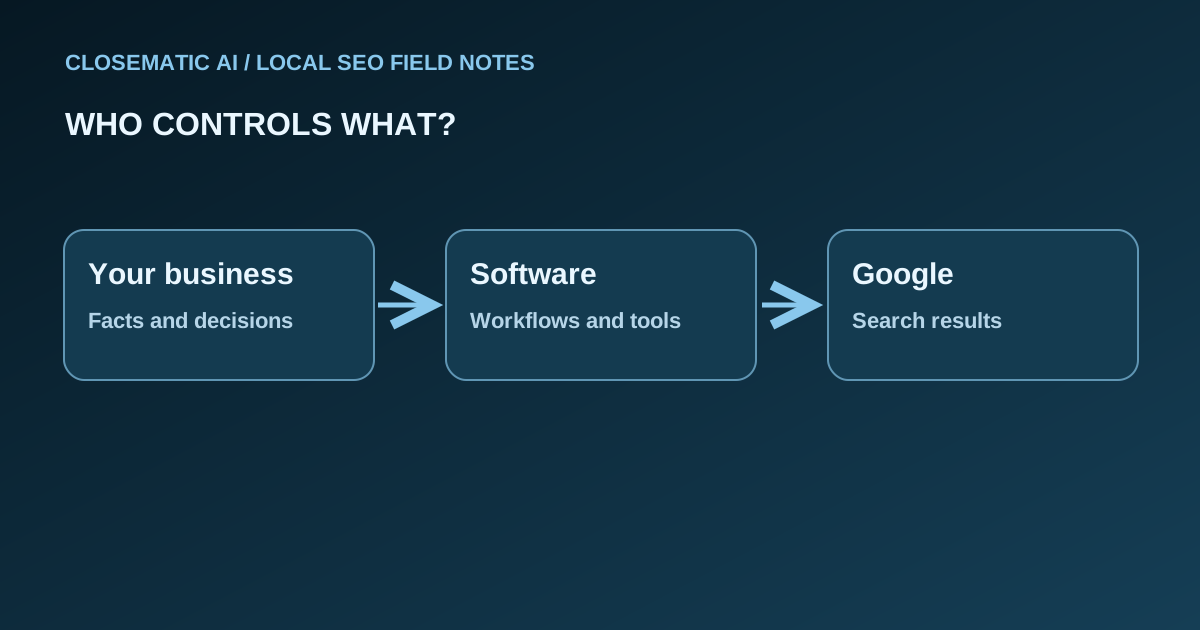
Your business, the software, and Google
Use this worksheet when a tool promises a result. Identify the actual action, the person who approves it, and the outcome that remains outside your control. A useful comparison names the evidence you can inspect instead of treating every completed task as proof of a new customer.
| Responsibility | What to inspect | What it does not establish |
|---|---|---|
| Your business | Approved name, services, contact details, and appropriate review replies. | Accurate facts alone do not secure a ranking. |
| Software workflow | Where information is entered, what action completes, and how your team verifies it. | A completed update is not evidence of a new customer. |
| Google results | What Google displays for the particular search and context you observed. | One observation does not establish visibility for everyone. |
First identify whether you are looking at a website result or a profile in Search and Maps. Then use the Business Profile measurement worksheet to interpret the signals without turning them into a sales claim.
What remains your responsibility
Local SEO software does not know every fact about your business. You know where you work, what you offer, whether a service is available, and how customers should contact you. With Closematic AI, you do a simple self-setup: add your business information and connect your Google Business Profile during onboarding. Then our system and team take on the ongoing work every month.
Assign someone to verify service descriptions and profile updates before publication. Keep access to business accounts with your company. When a review calls for a personal response, make sure the person replying understands the situation. If your team lacks capacity to do these tasks, include that constraint in your buying decision.
Also separate the channels. Lily is your Closematic AI assistant on WhatsApp or Slack, included in The New Google & AIs plan. She does not reply to your customers. Customer conversations sit in a different part of the business workflow.
Build a small source-of-truth sheet before your first update. Record the business name you use publicly, your contact details, your actual service list, and the person who approves changes. Compare that sheet with the website and profile. If they disagree, settle the factual question before asking software to publish either version. The extra check avoids turning an inaccurate detail into a consistent one.
Plan for change, too. A new service, a changed contact channel, or an unavailable appointment slot can make old copy misleading. Decide who notices those changes, who edits the relevant source, and how often your team reviews the information. A system helps coordinate that routine; it cannot know that your business changed unless someone tells it.
When you are ready to compare options, use the software evaluation worksheet and cost and responsibility checklist. If your problem is an absent profile, start with the profile visibility diagnostic before changing software.
How to judge a local SEO software plan
Start by writing down your actual operating needs. A business with one service and one profile may value clarity and easy updates. A team handling more conversations may need a leads inbox, included in The New Google & AIs. Neither situation should be reduced to a promise of “rank number one.”
On small screens, scroll sideways to read both columns.
| Question | What to verify |
|---|---|
| What is included? | Profile tools, site hosting, review replies, reporting, and support scope. |
| Who does the setup? | Whether you configure the account or a human team does it for you. |
| What costs extra? | Custom domain, optional work, or services outside the monthly plan. |
| What can be measured? | Reports available and the limits of interpreting those signals. |
The New Google plan is US$97 per month, and The New Google & AIs plan is US$247 per month. Billing begins when you buy, renews monthly, has no setup fee, and has no minimum term. You can request cancellation at any time; access continues through the end of the paid month. Refund requests are evaluated case by case. Review the plans and subscription terms before continuing to Square checkout.
Use the table to compare any option. If a vendor promises a fixed position in Maps or a guaranteed recommendation from an AI system, ask how it can control a platform it does not own. No local SEO software can honestly settle that question by showing a dashboard.
Do a five-minute trial of the workflow before you compare long feature lists. Write down one common task, such as changing a service description or replying to a review. Find where you would enter the information, how you would verify it, and how you would know the task finished. A workflow that makes this clear may matter more than a feature label you never use.
Then check the surrounding operations. Who receives a customer conversation? Where do appointments sit? Can your team tell which work remains open? These questions do not measure a Google ranking. They reveal whether the software will fit the way your business operates after the first week.
Evaluate software against two columns: work your team can perform and outcomes a platform decides. Buy for a better workflow in the first column. Treat the second as something to observe, never a guaranteed feature.
Google says its AI features use the same foundational SEO practices as Search; there are no special technical requirements that guarantee inclusion in AI Overview or AI Mode. Meeting the requirements still does not ensure that Google will index or display a page. This is why “AI-ready” should describe work you can inspect, such as clear service information and accessible pages, rather than a promised appearance. See Google Search Central’s AI features guidance for Google’s explanation.
For local rankings, Google explains that results are based mainly on relevance, distance, and prominence, and that there is no way to request or pay for a better local ranking. Read Google’s local ranking guidance when someone claims a tool can secure a Maps position. Use the guidance as a boundary for evaluating vendor promises, not as a checklist that guarantees a result.
Before you choose
Choose a plan after checking the work your team needs to perform, the facts it must supply, and the evidence it can inspect. Use this short checklist to turn a broad feature discussion into specific questions about responsibility, scope, reporting, and the full commitment before purchase.
- Name the specific task you need to complete.
- Identify who supplies and approves the business facts.
- Inspect the workflow in a demonstration.
- Separate software charges, domain costs, and your own time.
- Verify what the reporting measures and what it cannot prove.
Terms used in this guide
Keep these terms distinct when you compare a software demonstration with a business outcome. A profile is a public source, self setup describes responsibility, and observed performance describes evidence in a particular context. None of those terms alone establishes a guaranteed ranking, a qualified inquiry, or a completed sale.
- Business Profile
- A business listing managed through Google that can appear in Search and Maps.
- Self-setup
- Your business configures its information in the software.
- Observed performance
- A recorded signal for a defined context, not a guarantee of future results.
Common questions
Use these answers to clarify the scope of local SEO software before choosing a plan or changing your workflow. The questions separate product responsibilities, business facts, platform decisions, and subscription terms. For a specific Google account or profile issue, follow the original documentation and the linked diagnostic guide.
Will software do all local SEO work for me?
No. Software can organize tasks, but your business still supplies accurate information, configures its account, and checks the work. With Closematic AI, you do a simple self-setup, then our system and team do the ongoing work. Before buying, identify who will maintain service descriptions, review replies, and account access so the workflow has a clear owner.
Does local SEO software include a website?
It depends on the plan. The New Google includes a bonus one-page website, and The New Google & AIs includes a local website, while a custom domain is separate. When comparing offers, check the type of website included, who provides the business information, and which expenses sit outside the subscription. Do not assume that every software package includes the same scope.
Can local SEO software guarantee an AI Overview citation?
No. Google decides which pages and sources appear in its search experiences. Clear information and accessible pages support the work you control, but they cannot require Google to recommend your business. Evaluate software by the actions you can inspect, and treat an appearance in an AI answer as an observation rather than a guaranteed feature.
What review management is included in Closematic?
Both plans include reputation management: we request reviews from real customers and reply to the reviews you receive, with no incentives and no filtering of who is asked. Each reply still represents your company and the individual customer experience.
Does Lily answer my customers automatically?
No. Lily is your Closematic AI assistant on WhatsApp or Slack, included in The New Google & AIs plan. She works like a marketing project manager: you can ask what was done, what comes next and how your business is showing up. Lily helps you, the business owner. She does not reply to your customers.
What should I prepare before configuring the software?
Prepare verified business information: the public name, contact details, actual services, and the person responsible for approving changes. Check who owns the relevant business accounts and who may edit them. Resolve conflicting facts before configuration, so your team does not reproduce the same inaccurate detail across the website and profile.
How should I compare software with an agency?
Compare responsibilities before prices. A software subscription gives your team tools to use, while an agency service may assign work to people under a separate scope. Ask who configures accounts, writes information, approves updates, and checks results. Closematic AI does the work a local SEO agency does, automatically by our system and team, for a fixed monthly price with no minimum term.
What does a completed update prove?
A completed update shows that a specific task finished, provided you can verify the changed information. It does not prove a new ranking, inquiry, or sale. Keep a record of what changed and compare reporting definitions before drawing conclusions about performance. Separate operational evidence from customer outcomes that require their own records.
What are the monthly plan commitments?
The New Google costs US$97 per month and The New Google & AIs costs US$247 per month, with billing starting at purchase and renewing monthly. There is no setup fee or minimum term. Cancellation can be requested by email or support at any time, with access continuing through the paid period. Refund requests are considered case by case; a custom domain is separate.
Should I switch software because my profile is missing?
First identify the problem. Losing access to manage a profile is different from a profile not appearing publicly, and both differ from a low position in a search result. Use the linked profile diagnostic and Google documentation to investigate the cause before deciding whether another software subscription would address it.

Institutional publisher. Suggest a correction.