
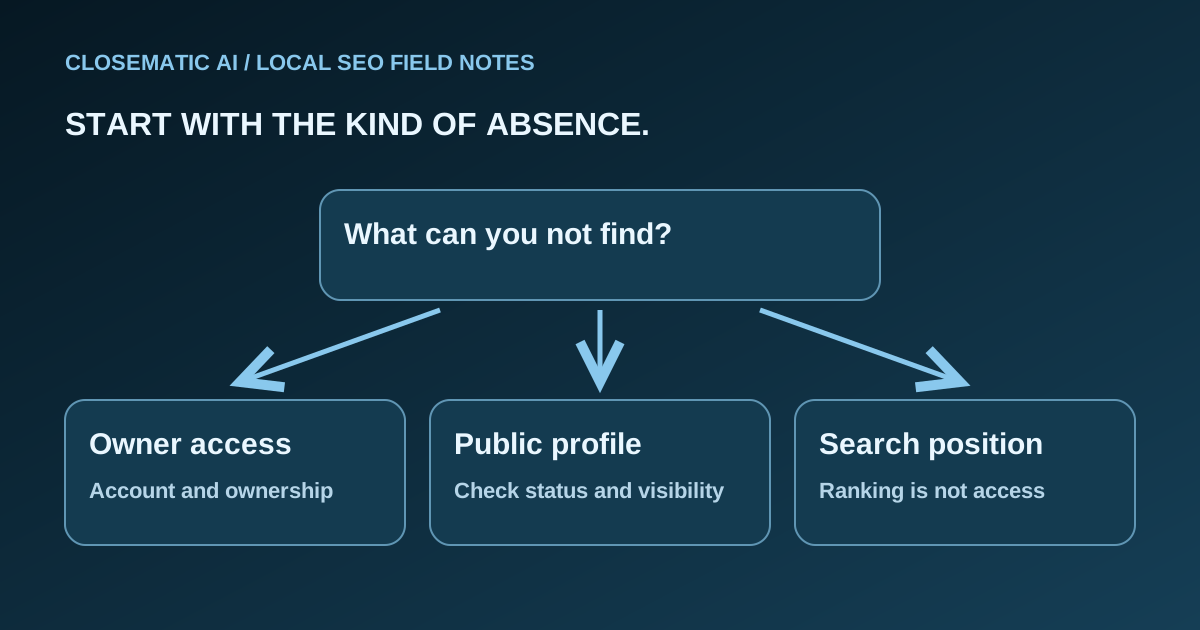
Identify which problem you actually have
“My business is not showing” can describe several unrelated situations. An owner cannot find the editing controls. A customer cannot open the public profile. Or a business appears by name but is missing from a broad service search. Start by choosing the right branch below.
| What you observe | First check | Next route |
|---|---|---|
| No editing controls in your account | Are you using the account associated with the profile? | Access and ownership |
| Profile cannot be found by its business name and city | Is the existing profile verified, under review or restricted? | Verification or public visibility |
| A suspension or disabled-profile notice appears | What decision and policy does the notice identify? | Google’s appeal process |
| Profile opens by name but is absent for a service query | Which query, search location and result surface did you check? | Local placement |
| Website is missing but the profile opens | Are you evaluating a website result rather than a Business Profile? | Website search investigation |
Use Google Search versus Maps to distinguish the surfaces before making changes. The table is a troubleshooting order, not a diagnosis of your individual account.
Branch one: you cannot find the management controls
Google recommends signing into the account associated with the profile, then searching for your business name and city or “my business.” In the Maps app, check the Business area and select the correct business if you manage more than one. Find your business on Google
Check the selected account deliberately. A personal account, shared office computer or former contractor’s account can make an access problem look like a disappearance. Ask the person who manages your business records which account owns the profile; do not circulate passwords or verification codes.
If another account owns an existing verified profile, follow Google’s ownership request guidance. It provides different routes for storefront or hybrid businesses and service-area businesses without a physical shop. Follow the route matching your business rather than creating a replacement.
For your internal record, write down who is authorized to manage the profile and where ownership confirmation is stored. Keep sensitive documents private. You need a reliable handoff record, not a public list of account details.
Branch two: the public profile is missing
Try the exact business name and city in Search and Maps. Record whether you can open the existing public profile, not merely whether its management panel appears. Google’s profile discovery guide separates finding your profile from keeping its information visible and compliant.
Use a short evidence log:
- Business name and the public profile link, if available.
- Exact search phrase and surface checked.
- Whether you were signed in and which account role you used.
- The status or notice shown in the management view.
- Recent factual changes, such as a real move or ownership handoff.
Do not include customer information in screenshots shared for troubleshooting. Save notices as written rather than translating them into “Google banned us” before you have established the status.
If verification is requested
Use the options Google presents for that profile. Google chooses the available methods, and a business may need more than one. If verification is under review, follow the current instructions instead of repeatedly submitting different business details. Verify your business on Google
A verification request and a suspension are different branches. Do not use an appeal as a substitute for completing verification, or assume purchasing marketing software can bypass either process.
Branch three: a suspension or restriction is shown
Read the identified policy and check the actual business details before submitting an appeal. Google’s suspended-profile guide says not to create another profile for the same business. Its appeal process allows supporting evidence, such as business registration or a license, and explains where to view a decision’s status.
Prepare a concise record: what the notice says, what factual inconsistency you found, what you corrected and which documents substantiate the business. Submit documents through Google’s official process, not in public comments or an unsolicited message. Follow the current appeal instructions; reinstatement is Google’s decision, with no outcome promised here.
Review the business representation guidelines before editing. Use the real business identity, an accurate address or service area and appropriate categories. Do not invent a storefront, insert promotional keywords into the business name or create a second listing as a workaround.
Branch four: the profile exists but placement is weak
A business found by its name has passed a different test from appearing for “electrician near me.” Treat that as a placement question unless other evidence shows an account problem. Record the query and search context before deciding what to investigate, rather than starting an unrelated recovery process.
Google describes local ranking in terms of relevance, distance and prominence. It recommends complete, accurate business information and says you cannot request or buy a better local position. Google’s local ranking guidance
For example, imagine a service business is visible by name near its base but absent for a broad search farther away. That hypothetical observation is not proof of a penalty. Write down the location and exact phrase, then check whether the profile accurately describes the business. Avoid changing its legitimate address simply to influence a test.
Compare observations with Business Profile performance over a relevant period. A single search is a spot check, not a complete report of where every potential customer sees you.
If your profile is publicly visible but your concern is absence from an AI answer, use the local business AEO checklist to check the relevant public pages and facts. That is a different investigation from recovering a missing Business Profile.
Preserve the working parts while investigating
An unclear visibility problem does not justify deleting profiles, replacing a working website or changing domain DNS. Keep a record of each proposed correction and the evidence behind it. Make factual, justified changes rather than a batch of guesses that leaves you unable to tell what happened.
Software may help organize profile work and related customer tasks. It does not control Google’s account decisions. Read what local SEO software can and cannot do before buying a tool as a supposed recovery shortcut.
Your next-action checklist
Choose the next action from the status you actually observed, then save enough evidence to repeat the check. Account access, public availability and search placement require different routes. Keeping those routes separate helps you correct a real problem while preserving the parts of your business presence that already work.
- Identify whether access, public visibility, placement or the website is missing.
- Confirm the correct account and existing profile before adding anything.
- Record the exact notice and verification state.
- Check factual business details against Google’s guidelines.
- Follow the official route matching the issue.
- Preserve working profiles, website settings and private records.
- Recheck the same observation after the relevant process progresses.
Once access and the profile’s status are understood, Closematic AI’s local SEO solution explains the ongoing self-setup workflow. Routine maintenance and incident resolution require different evidence; neither comes with a guaranteed position in Google.
